


















Change nameservers at GoDaddy
This is step 4 of Move your DNS to Cloudflare. The two names you paste in come from your portal. Nothing else at GoDaddy changes, and the old records there stay where they are.
Best after business hours. Email and your website can pause for a few minutes while the internet catches up. Do it in the evening and nobody notices.
Before you start
- Your portal open at the domain’s row, step 4, where the two Cloudflare nameservers are shown with a Copy button each.
- Your GoDaddy sign-in. If the domain has Domain Protection, GoDaddy will also ask for a code by text, authenticator app or email.
- If the portal says Turn DNSSEC off there first, do that first: in GoDaddy, open the domain, select DNS, then DNSSEC, then Turn Off DNSSEC and Remove. Wait until GoDaddy shows it off before you go on.
Steps
-
In your portal, select Open GoDaddy. It takes you straight to the Nameservers screen for your domain. Sign in if GoDaddy asks. If you got there another way, sign in to your GoDaddy Domain Portfolio instead.
-
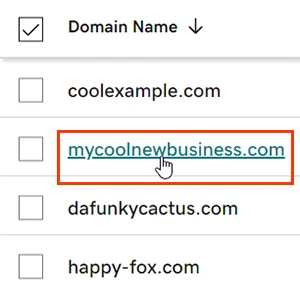
Select your domain to open its Domain Settings page. Skip this if the portal's link already opened the domain.
Picture: GoDaddy Help -
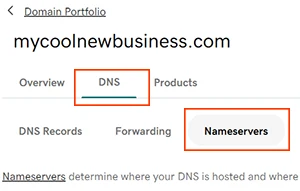
Select DNS, then Nameservers.
Picture: GoDaddy Help -
Choose I'll use my own nameservers. Paste the first Cloudflare nameserver from your portal into the first box and the second into the second box. If GoDaddy shows more than two boxes, leave the extra ones empty.
-
Select Save, then Continue. If GoDaddy asks for a verification code, enter the one it sent you.
-
Back in your portal, select I changed them, check now.
What happens next
- GoDaddy says most changes take effect within an hour and can take up to 48 hours to reach everyone. Cloudflare usually confirms within minutes, sometimes up to a day. The portal says Cloudflare is confirming until then.
- When both agree, the domain’s pill reads Protected.
- Leave the old DNS records at GoDaddy alone for two days. They do no harm and they are your safety net.
Related
- Move your DNS to Cloudflare, the whole flow
- Why Cloudflare
- Give us access at GoDaddy, if you would rather we did this
- Domain Security, the card this is for