


















Give us access at Squarespace
You stay the owner. We get a seat that can manage your domain and its DNS records. You can remove us at any time.
Invite this address:
[email protected]
Squarespace has two ways in, depending on what you have there. Most people have a website.
If your website is on Squarespace
Squarespace only lets the owner and administrators manage domains, so we need the Administrator role. An administrator can’t transfer ownership of your site.
-
Open your Permissions & Ownership panel, pick your site if Squarespace asks, then select Invite Contributor.
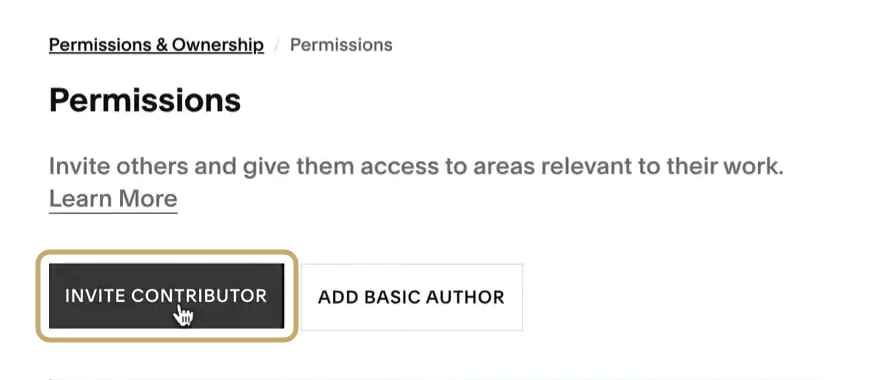
Picture: Squarespace Help video, gold circle added by us -
Type WILDCARD as the name and
[email protected]as the email.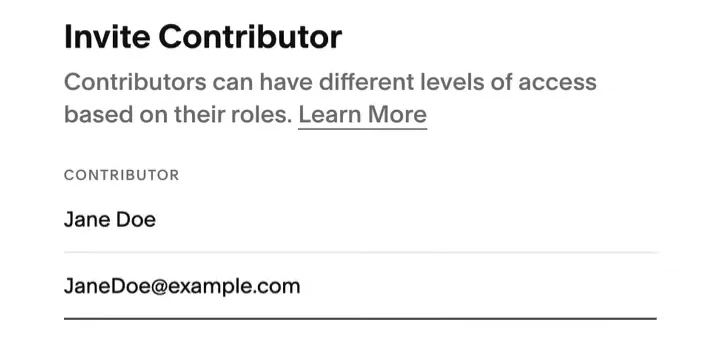
Picture: Squarespace Help video -
Switch on Administrator. Leave the other switches as they are.
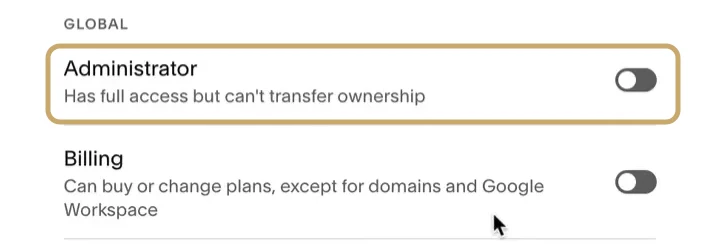
Picture: Squarespace Help video, gold circle added by us -
Select Invite. Squarespace emails the invite to us, and you'll see it under Invites Sent.

Picture: Squarespace Help video, gold circle added by us
On the Basic and Legacy Personal plans, a site can have one contributor. If that seat is taken, email [email protected] and we’ll work it out with you.
If you only have a domain at Squarespace
No website, just the domain? Invite us as a domain manager. A domain manager can change DNS but can’t see billing.
Open your domains dashboard and click your domain.
Click Permissions, then Invite domain manager.
Type WILDCARD as the name and
[email protected]as the email, then send the invite.
What happens next
- We accept the invite from our own Squarespace account.
- In your WILDCARD portal, select I’ve sent the invite so we know to look for it.
- If the email doesn’t reach us, Squarespace lets you copy an invite link from Invites Sent. Email that link to [email protected].
Change or remove our access
Open the same Permissions panel, click … next to our name and remove us. Squarespace’s steps.
Related
- Give us access to your domain, for every other provider
- Give us access at GoDaddy
- Domain Security, the card this access is for